Table of Contents
Registering student members
All bridge students who are learning from an approved teacher are eligible for one year of free EBU membership. To get this, they have to be registered with the EBU at the start of their course. This help page explains what teachers need to do to get their students registered, and how to remove them if necessary.
Who can register students?
Any member of EBTA (the English Bridge Teaching Association) is automatically able to register students. Additionally, any approved teacher known to EBED may also register students. Contact Lisa Miller with your information if you think you qualify.
Teachers need to have an EBU number to be able to log in to My EBU, but they do not have to be members of the EBU.
Getting the membership form URL
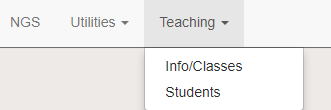
If a teacher logs in to My EBU, they will find a Teaching menu at the top. If you don't see this, it probably means we don't know that you're a teacher (contact Lisa Miller on the email above to query this). The Students page gives information about all of your students, and gives you access to a link to the student form.
Clicking Generate URL will generate a special URL that you (and only you) can use to register these students.
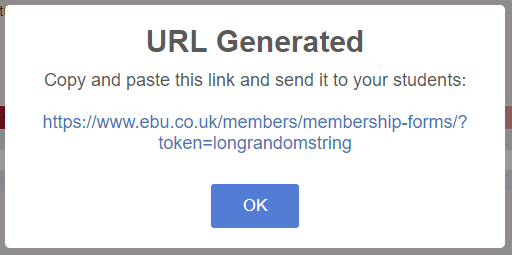
Copy and paste this link (either by selecting it in the browser, or clicking on it and copying the URL in the address bar) and send it to your students. You can do this via email, Whatsapp, Facebook messenger, or whatever is most convenient for you. The only thing we ask is that you do not publish this in public.
Two things to note about the link:
- It is time limited, so it won't work forever. Tell your students to register straight away, or they won't be able to join.
- It references your own account, so we will know which teacher registered these students.
Registering the students yourself
The intention is that you send the students the link and they fill out their own details; this will save you time and avoid any mistakes. But you are, of course, free to fill the form out on your student's behalf if they are unable to. Just click on the link and enter their details.
Managing your students

Further down the page, you will find a list of all your students, with their EBU number and the dates of their membership. At the end of the row you will find a red cross icon, which you can click to remove that student from your list. This will end their membership, presumably because they have ceased to attend your classes.